


 Translated from 日本語 • View original
 Have you ever had trouble knowing the status of the member you want to contact right away? In this article, we will talk about schedule management, which is essential in today's world where hybrid work has become mainstream.
About Scheduling

Recently, remote work and online meetings have become mainstream, and many companies are adopting hybrid work styles by introducing free addresses. Therefore, there are various situations just in the place where you work, such as days when you go to work, days when you work remotely, and days when you go out.
In that case, when coordinating schedules with members who work together, it is necessary to know where they work, and these factors make schedule management more complicated than before.
## The problem of not knowing the schedule of others

There are various issues that arise in schedule management, but one that I often hear from customers is that they don't know where others are working.
This issue triggers the following problems:
・I want to contact you right now, but I don't know if I'm coming to work or working remotely.
・I want to set up MTG using a conference room with members, but I don't know a convenient day.
・I want to hand over the equipment, but I don't know when I will come to work next time.
The above example is a challenge for one person, but as the number of people increases to two or three, it becomes more difficult to check and adjust the schedule.
Let's take a look at how Colorkrew Biz solves these challenges.
## Schedule Checking Made Easy with Colorkrew Biz
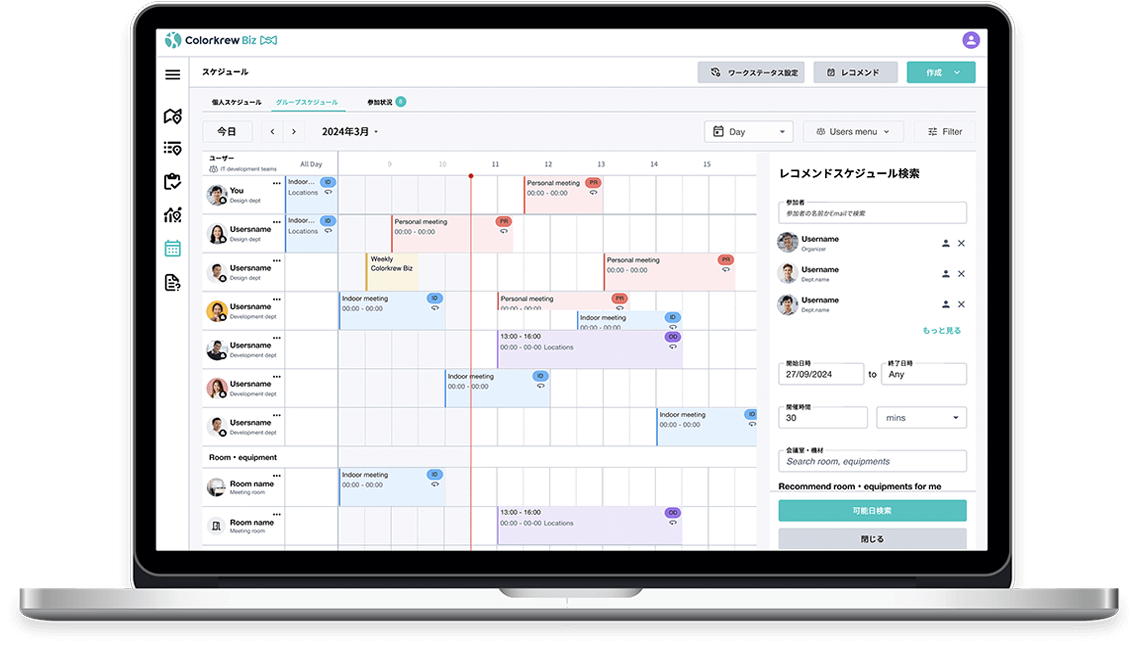
The challenge of not knowing where they work when looking at other people's schedules and having to check them directly can be solved with Colorkrew Biz's scheduler feature.
By linking Colorkrew Biz with Microsoft 365, your schedules registered in your Outlook calendar will also be linked to Colorkrew Biz, and you can also view and edit them. In addition, you can register your work status, such as coming to the office or working remotely, so you can let them know where you plan to work.
In addition, in the group schedule, you can add other users to the calendar, so you can check the schedules of other users in a list.
## Smooth scheduling with recommendation function
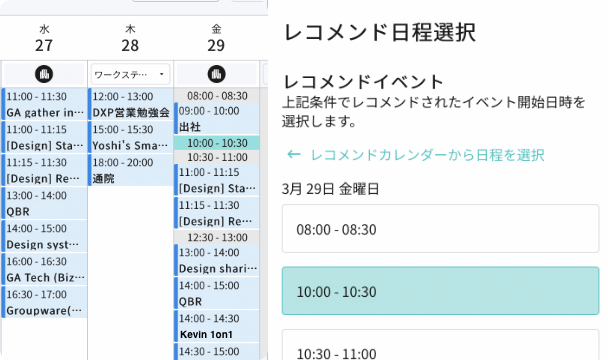
It is difficult to coordinate events such as meetings with multiple users. These challenges can be solved with the recommendation function of Colorkrew Biz's scheduler.
In the recommendation function, if you select the relevant multiple users and set the period for which you want to schedule, it will recommend a date suggestion that can be scheduled for multiple users.
Also, if you want to use a meeting room, you can also select it and it will display the available dates, including the meeting room schedule.
After checking the available dates and times one by one from the calendars of the relevant person so far, there is no need to go through the troublesome work of asking for confirmation on candidate dates, and checking again if the schedule does not match.
## Summary: Reviewing Work Styles Starts with Schedule Management
This time we talked about schedule management.
The challenge of not knowing where others work or having difficulty scheduling can be solved with Colorkrew Biz's scheduler feature!
Colorkrew Biz also has a "conference room management function" that allows you to check the availability of meeting rooms and an "equipment management function" that allows you to manage rental items.
We can help you reduce various nameless jobs, so please feel free to contact us.